Testing Automatic Chemical Structure Recognition with OSRA 10

Posted by Rich Apodaca Thu, 07 Feb 2008 15:45:00 GMT

Countless chemical structures exist only in a raster image format such as JPG, GIF, BMP, or on a printed page or PDF. While perfectly readable to humans, they are very difficult for machines to read. Given the sheer number of these structures that have been produced over the last few decades, the only hope of excavating them from their current data tombs is with computer recognition of some kind. This article discusses OSRA, an open source software package designed to do for chemical structures what Optical Character Recognition did for the printed word.

An online version of OSRA was used to read PNG images of chemical structures produced by an application based on ChemWriter. Both aliased and antialiased images were used and atom coloring was disabled:
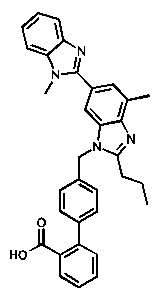
Structure interpretation failed for the antialiased image at both 300 and 72 DPI resolution. This was the SMILES that was produced at 72 DPI; the one produced at the 300 DPI setting was not much more encouraging.

However, using the aliased imaged at 72 DPI produced the correct structure.

Could the failure to recognize the antialiased image be due to a problem with the ChemWriter application's rasterization method? Apparently, not. When a screen capture utility was used to produce the image from the ChemWriter application window, the wrong structure was again produced. Here, the PNG encoding was not through a Java program but rather the underlying operating system (Linux) using a standard screen capture utility.

To test the idea that line thickness might play a role in determining the quality of OSRA's interpretation, the antialiased image below was submitted:
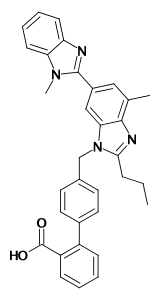
Still, the incorrect structure was produced.

Apparently, images of 2D structures in which antialiasing has been applied cause difficulties for OSRA.

Fortunately, the ChemWriter-based application embedded the full connection table of the molecule into all of its images as metadata, so an optical recognition step is unnecessary.

Provided that no antialiasing has been applied to images, OSRA would seem to be a capable tool for converting rasterized 2D chemical structures into machine-readable format.

Image Credit: jspad

Comments

Leave a response

  1. Bear Fri, 08 Feb 2008 03:52:31 GMT

    "data tombs".....now there's a phrase that well describes the tens of thousands of data tables of biological activity of chemicals that get entombed in the stacks every year. The writing surrounding the tables is copyrighted but the data is not. Science would be propelled forward if all that bioactivity data was captured into databases and made widely available.

  2. Bear Fri, 08 Feb 2008 04:09:15 GMT

    Interesting that the antialiased image which looks better to us humans looks worse to the scanner. I suppose all those grey or half squares added with antialiasing don't register so well with digital scanners as with our analog eye/brain. In a way, antialiasing plays a trick on our vision, which works on us but not as well on digital equipment. Looking at wikipedia on this is a worthy reminder of how easily visual tricks can be played on us. http://en.wikipedia.org/wiki/Anti-aliasing http://en.wikipedia.org/wiki/Visual_illusion

  3. Rich Apodaca Fri, 08 Feb 2008 17:52:08 GMT

    The article may be misleading about what was done with image resolution. Images of varying resolutions were not submitted.

    Only the image resolution setting on the Web application itself was changed. The exact images in this article were submitted in each case.

  4. Rich Apodaca Fri, 08 Feb 2008 17:55:42 GMT

    Bear, I thought the difference between aliased vs. antialiased images was interesting as well. It might be a general feature of OSRA (or OCR in general) or not - I'm still not sure.

  5. Igor Sun, 10 Feb 2008 04:07:00 GMT

    I have added a new (and somewhat experimental) feature - if you enter zero as a resolution parameter OSRA will automatically try a set of predefined resolutions (currently 72,150 and 300dpi) and select the best fit. Of course if your image was scanned at 500dpi it will not help much, but it seems the vast majority of the images floating around are of one of the three "depths" mentioned above. Everyone is welcome to test how well the automatic fit performs vs. the manual selection (i.e. when you know the resolution the image was scanned at).

  6. Rich Apodaca Sun, 10 Feb 2008 14:46:49 GMT

    Igor, that's a great addition to the UI.

    Unfortunately, it now looks like the aliased image above now produces a structure in which the carboxyl group is interpreted as an acetal (at both "0" and "72" DPI setting). I'm pretty sure (but not certain) that this didn't happen before.

    Any ideas?

  7. Igor Sun, 10 Feb 2008 14:57:48 GMT

    Rich, no, I think this mis-interpretation was there before. I remember being surprised that you said " using the aliased imaged at 72 DPI produced the correct structure" while it was missing a double bond. Interestingly enough the third image shows the correct double bond in that position.

  8. Igor Thu, 14 Feb 2008 02:32:41 GMT

    I have improved the thresholding and the handling of color images somewhat. If someone could test it with antialiased and/or color examples I would much appreciate it!

  9. Rich Apodaca Thu, 14 Feb 2008 04:14:11 GMT

    Igor - simply amazing. It worked perfectly with the antialiased image above.

    I'll write a follow-on article discussing my results with more antialiased images and color images shortly.

  10. Rich Apodaca Thu, 14 Feb 2008 04:28:16 GMT

    Oops, better make that almost perfectly. One of the double bonds was missing (the one on the aromatic carbon bearing a methyl group.

    Still, quite impressive.

Comments